

I hope you enjoy reading this blog post. If you want my team at Web Choice UK to handle your web design and marketing, click here to get in touch.
Editor: Daniel BurtShort answer: Most enquiry forms ask questions visitors can't answer yet, such as guest numbers, budget or dates, so people either guess or leave. A better approach is to give them a planning tool first. They explore, see the result and a guide price as they go, and by the time they reach the form most of it is already filled in. The visitor does less typing, and the business gets an enquiry it can actually quote.
Why most enquiry forms ask too early
Picture a couple looking at wedding venues. They like the photos. They click "Enquire" and get a form asking for their date, guest numbers, budget and a message. They haven't settled any of those yet. That's partly why they're looking at venue websites in the first place.
So they type "around 100?" and "not sure" and send it, or they don't send anything. The venue then spends three emails finding out what the form should have told them.
This happens far beyond weddings. Builders, kitchen fitters, event hire companies, training providers and B2B services all have the same form: a box for every question the sales team needs answered, placed at the very end, with nothing to help the visitor work out the answers.
Length is part of the problem. Baymard Institute's checkout research found the average checkout in 2024 had 11.3 form fields, while most sites only need 8. Every field you can fill in for someone is one less reason to stop.
What a planning tool does that a form can't
A form asks. A planning tool lets the visitor try things and see what happens. Move a slider and the room fills up. Pick a package and the price changes. The questions on the form get answered along the way, because the visitor has been answering them without noticing.
There's a second benefit, known as the IKEA effect: people value things more when they've helped make them. Michael Norton, Daniel Mochon and Dan Ariely named it in 2012, and it has held up since. A 2023 meta-analysis by Ayellet Pelled at the University of Wisconsin-Madison, pooling 55 studies with 5,454 participants, found a moderate effect that stayed positive after allowing for publication bias. In the original experiments, though, the extra value only appeared when people finished the task. When they were stopped partway, it disappeared.
For a website, that suggests two things. Let the visitor build something, and make sure they end up with a finished result: a layout, a timeline, a guide price, rather than half a configuration and a "contact us for details".
How it works on a wedding venue website
Weddings are a good test because the stakes are high. Hitched's Wedding Industry Report put the average UK wedding at £21,990, based on 2,020 couples. Nobody books a venue on a whim.
We designed a concept venue, Sallowfield Barn, around one idea: let the couple plan their day on the website, then hand that plan to the enquiry form.
1. Start with something personal and easy
The first thing a couple sees is the barn itself. They pick a season, switch on the evening lights, and type their names, which appear on the welcome sign by the door. Underneath, a line tells them what that season costs and how many Saturdays are still free.
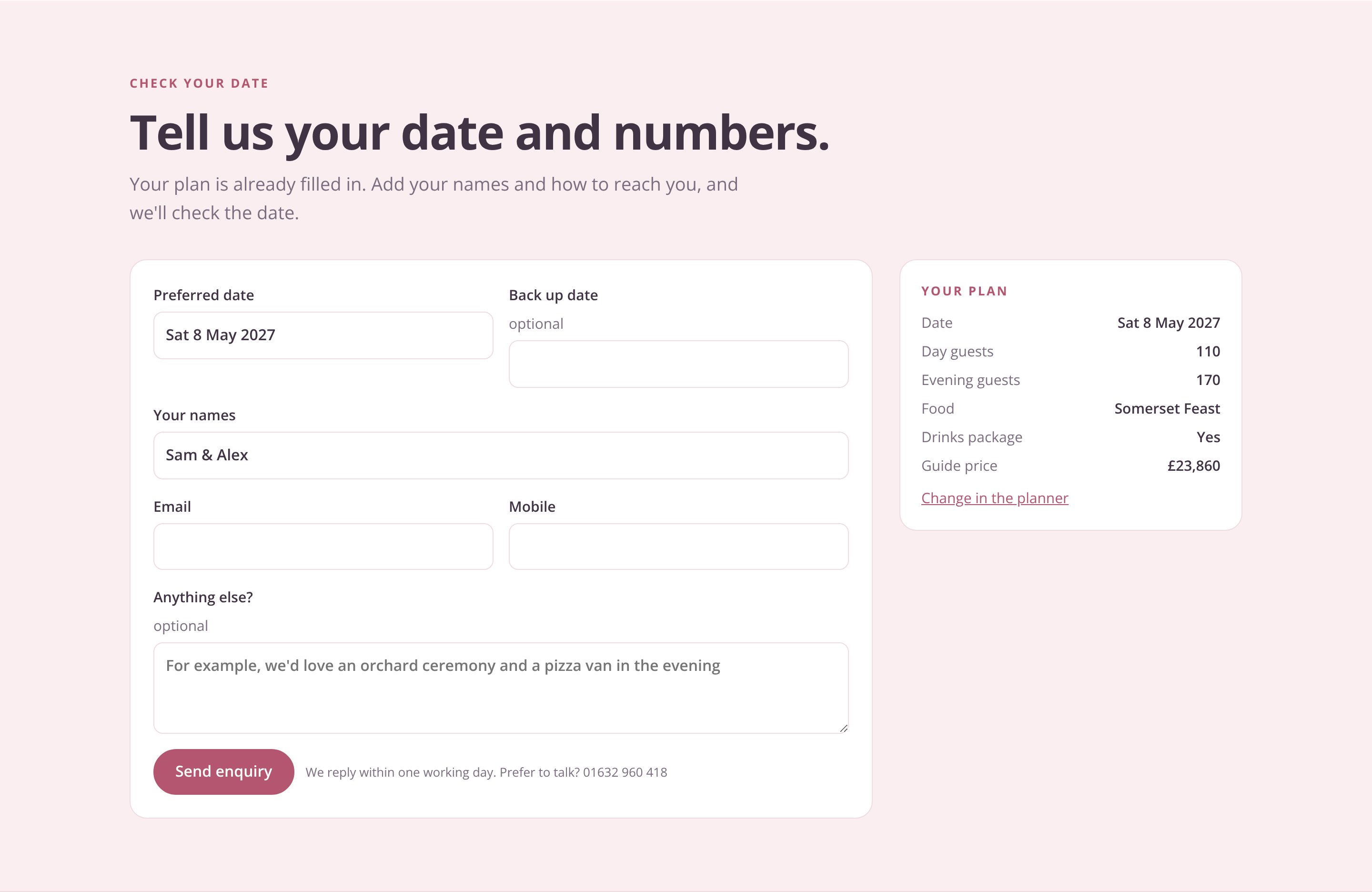
Choose a season, switch on the lights and see your names on the welcome sign.
There's no pressure at this point and nothing to get wrong. It gets them interacting before any real decision, and the names they type are carried through to the enquiry.
2. Turn the hardest question into a slider
"How many guests?" is hard to answer early on, because a number means little until you can see it in a room. So the floor plan answers it. Every dot is a guest. Move the slider and the Long Barn lays itself out: for 110 day guests, thirteen round tables of eight plus a top table.
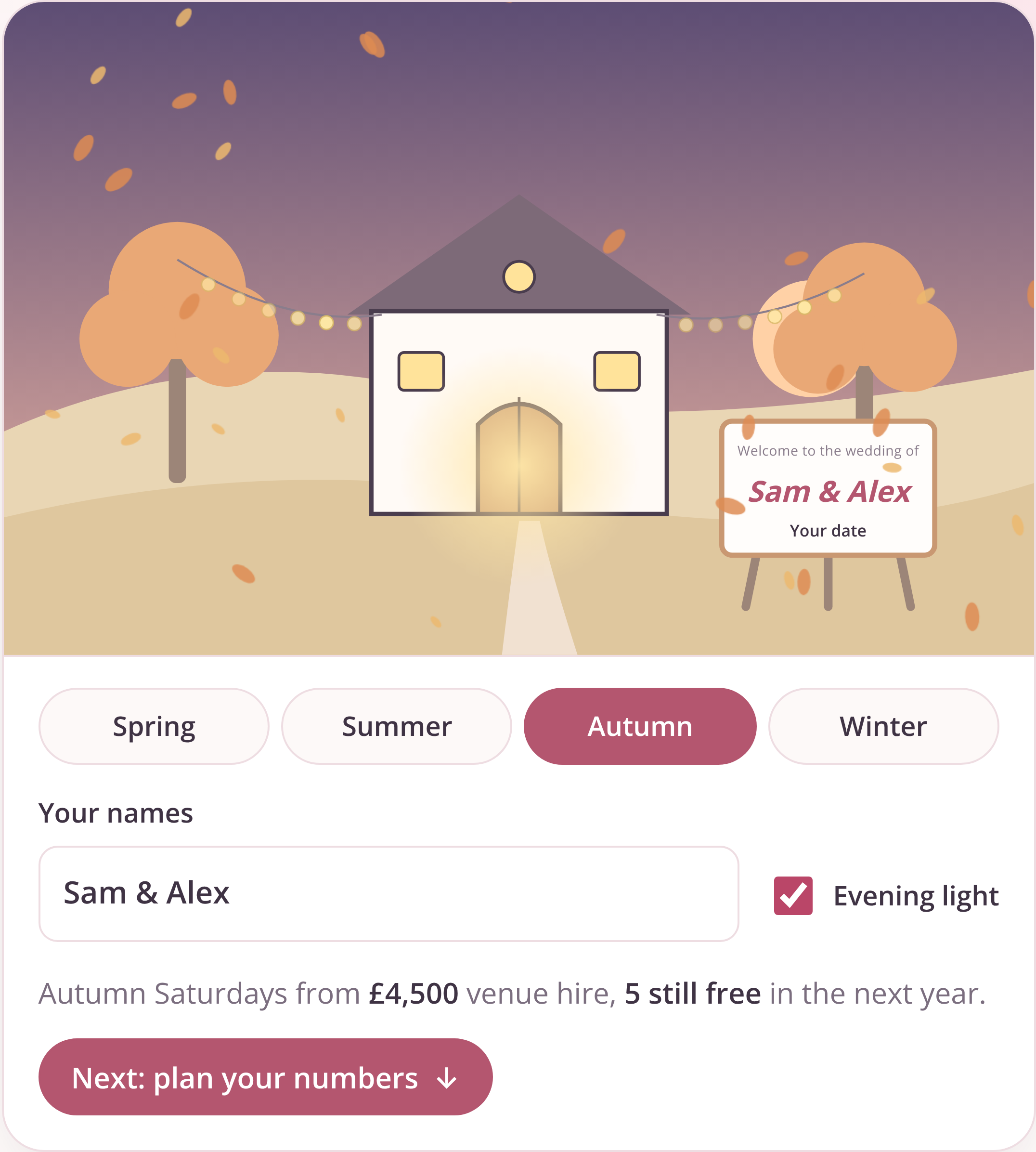
The wedding breakfast for 110: every dot is a guest.
The question "will we all fit?" is answered on screen without anyone having to email anyone.
3. Show the day, not a spec sheet
Capacity figures don't help a couple imagine their day. Seeing the room at each stage does. The planner moves through the ceremony at 2pm, drinks at 2:45pm, the wedding breakfast at 5pm and the evening from 7:30pm, and the plan changes with each one. When the evening guests arrive, the tables clear, the dance floor opens up and the extra dots appear.
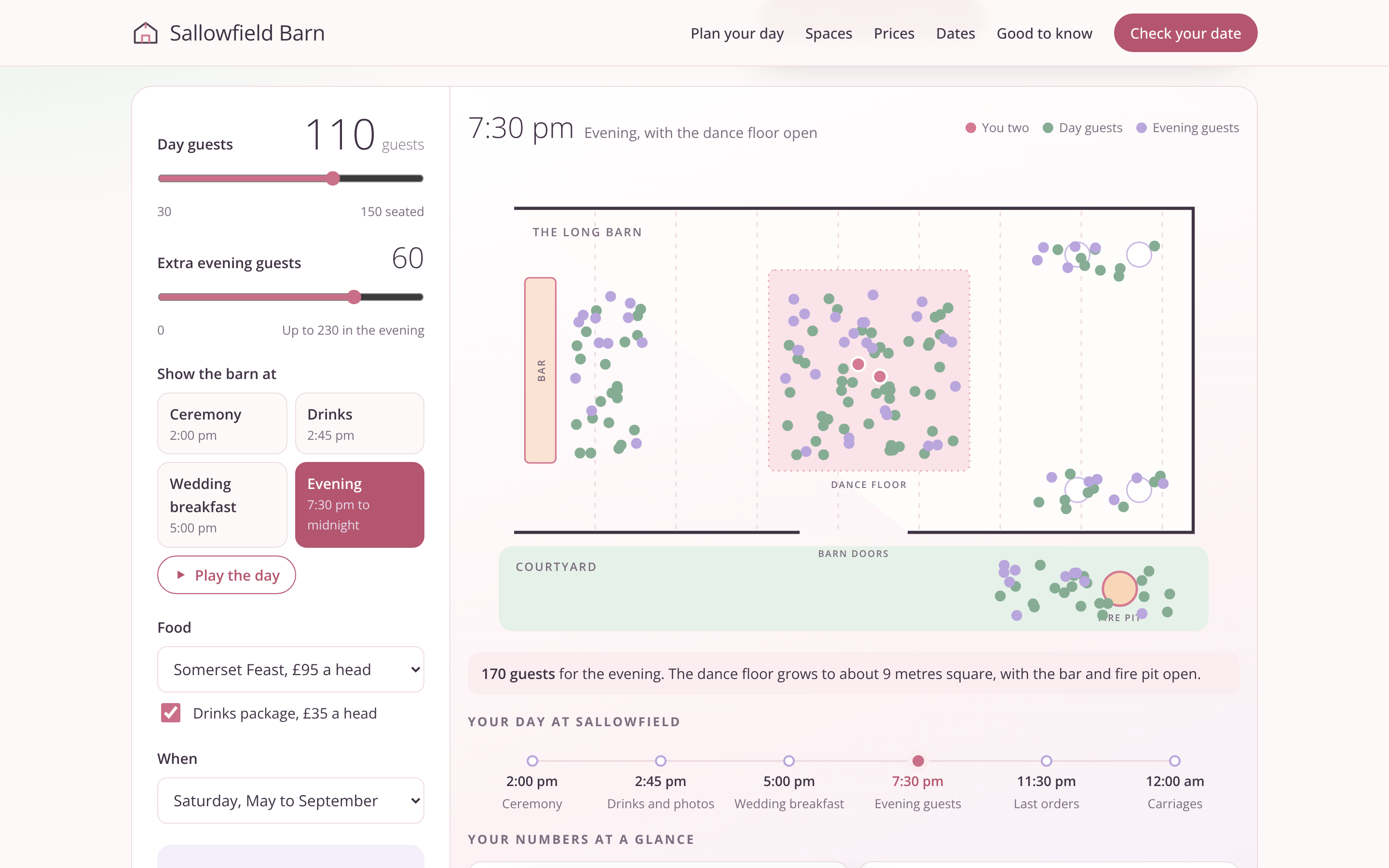
The evening view: tables clear, the dance floor opens and the extra guests arrive.
4. Add up the price as they go
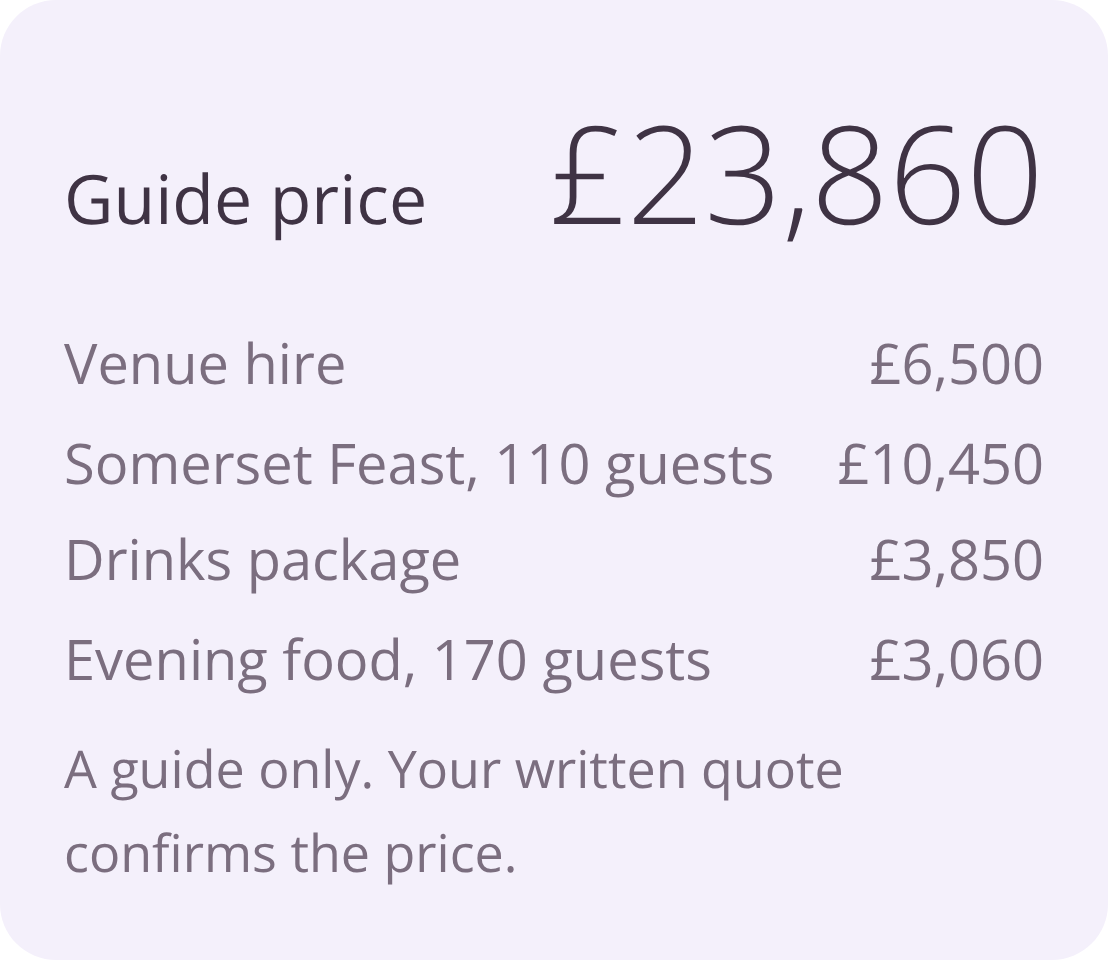
As the couple chooses food, drinks and a season, a guide price builds up with each line shown: venue hire, food for the day guests, the drinks package, evening food for everyone. Underneath, it says plainly that it's a guide and the written quote confirms the price. Hidden totals put people off: in Baymard Institute's current research into why online shoppers abandon checkouts, 12% said they couldn't see or work out the total cost up front.
A guide price that adds up line by line, labelled clearly as a guide.
This is the finished result the IKEA effect depends on. The couple has made a plan and can see what it costs. It also means an enquiry arrives with a budget that fits, rather than a hopeful one.
5. Put availability next to the price
Dates are the other thing couples need before they can enquire. A calendar shows which dates are free, on hold or booked. Picking a free Saturday updates the price for that date and adds it to the plan. Lower prices on Fridays and Sundays are shown alongside, which helps the venue fill quieter days.
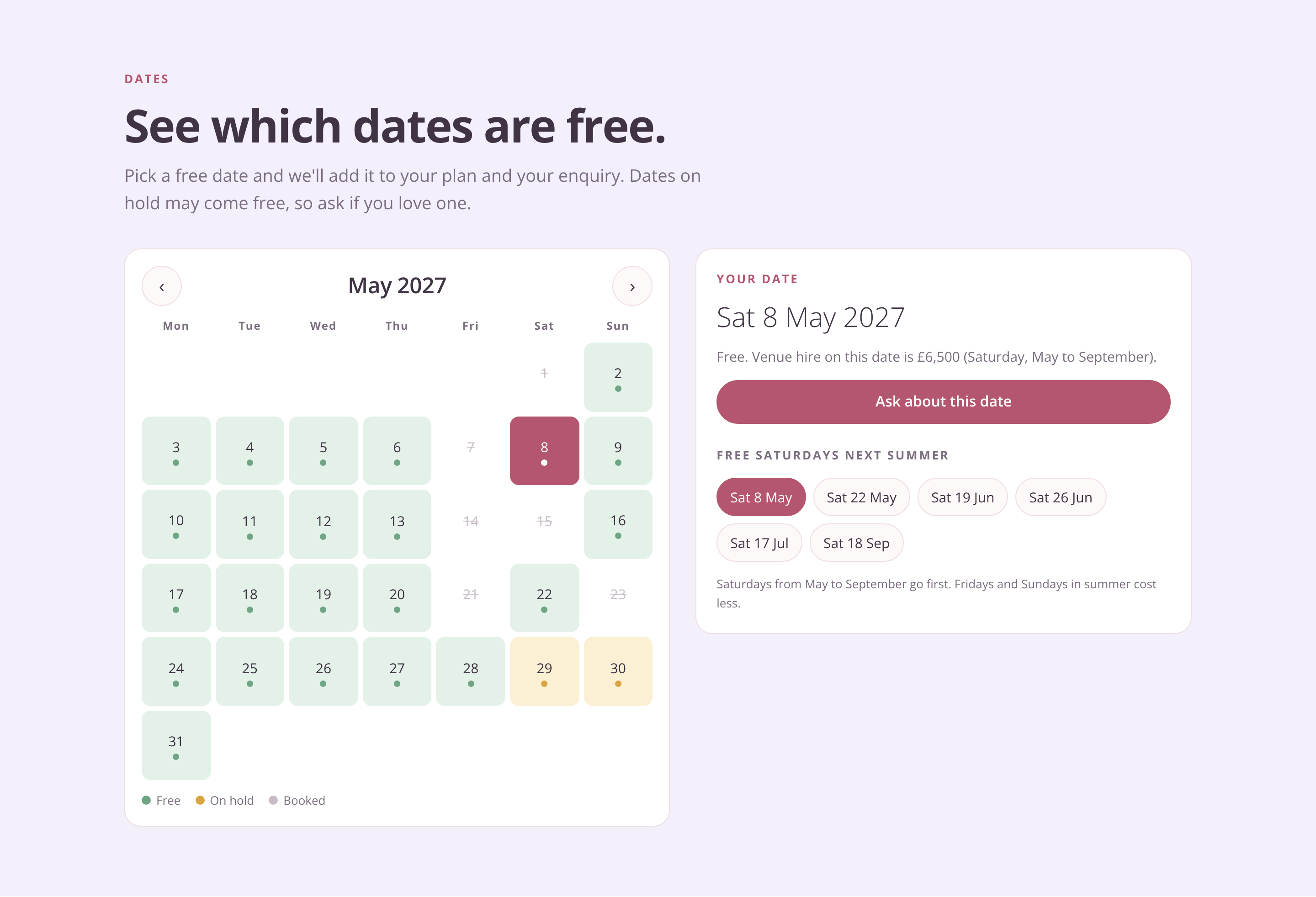
Free dates sit next to the price, and picking one updates the plan.
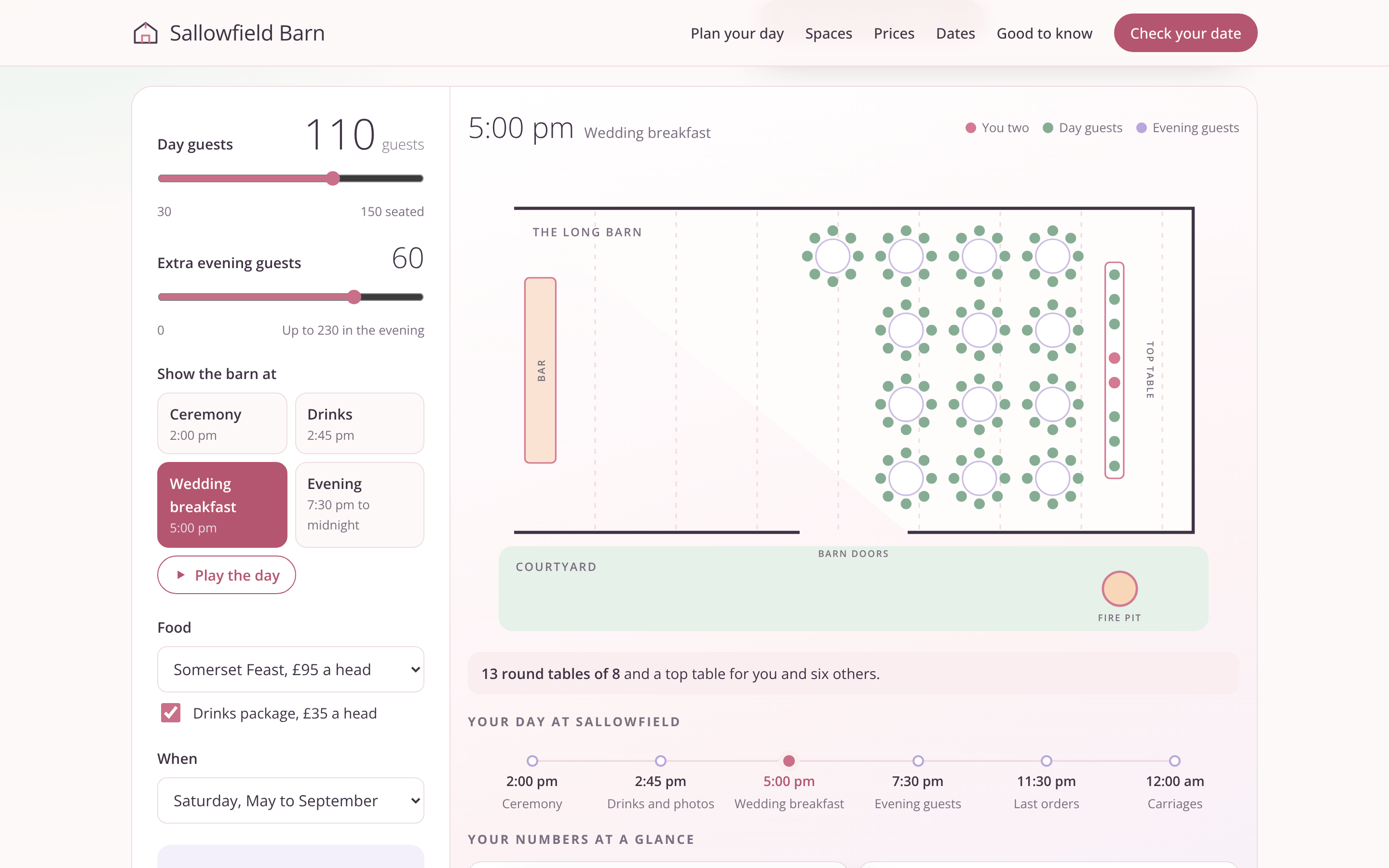
6. Hand the plan to the form
By the time the couple reaches the enquiry form, it already holds their names, chosen date and plan: day guests, evening guests, food, drinks and guide price. The form tells them so, then asks only for an email address and a mobile number, with an optional back-up date and an optional message.
By the time the couple reaches the form, their plan is already in it.
The site also keeps one enquiry per couple. If they come back and change their numbers, the existing enquiry is updated instead of sending a second one.
What the business gets
From the venue's side, every enquiry arrives with a date, day and evening numbers, a food and drinks package and a guide price the couple has already seen. The team can reply with a quote instead of a list of questions. And because the couple has worked out a plan they're happy with, the conversation starts from where they want to be.
The form itself gets shorter. The website simply asks its questions earlier, at a point where answering them feels like planning.
See it in action
The walkthrough below follows a couple from the welcome sign to a sent enquiry.
Where else this works
Any business that quotes before it sells can use the same approach:
- Building and home improvement: pick the room size and finish, see a price range, then enquire.
- Event and equipment hire: choose the guest count or space, see what fits and what it costs.
- Training providers: pick the number of staff and the format, see dates and a price per person.
- B2B services: answer a few questions about the size of the job and get a guide price before a sales call.
The pattern is the same each time. Help the visitor work out what they want, show them a finished result with a guide price, and pass all of it to the form.
A quick checklist for your enquiry form
- Does the form ask for anything the visitor is unlikely to know yet?
- Could a tool on the page help them work it out instead?
- Do they end up with a finished result, such as a plan, a layout or a guide price?
- Is the guide price clearly labelled as a guide?
- Are dates or availability shown before they enquire?
- Does everything they've chosen carry through to the form automatically?
- Is the form down to contact details and an optional message?
Frequently asked questions
How many fields should an enquiry form have?
As few as you need to reply properly. Baymard Institute found most checkouts need only 8 fields, against an average of 11.3. For enquiry forms, anything you can fill in automatically from earlier choices on the page doesn't need its own question.
What is the IKEA effect in UX?
It's the finding that people value things more when they've built them themselves. A 2023 meta-analysis of 55 studies found a moderate, consistent effect. The original 2012 research by Norton, Mochon and Ariely found it only held when people completed the task, so a planning tool should end in a finished result.
Should I show prices on a quote-based website?
A guide price, clearly labelled, helps visitors decide whether to enquire and helps you receive enquiries that fit your prices. The written quote can still confirm the final figure.
What is a pre-filled enquiry form?
It's a form that already contains the choices a visitor made elsewhere on the site, such as dates, quantities or a package, so they only need to add contact details. It saves the visitor typing and gives the business a complete brief.
Does an interactive planning tool work on mobile?
It can, as long as it's designed for small screens. Sliders and taps work well on phones; the layout needs the controls and the result visible together, or stacked in a clear order.
Sallowfield Barn is a concept we built at Web Choice; the venue, prices and dates are samples. If your enquiries arrive with more questions than answers, we'd be happy to talk through what a planning tool could look like on your site.
Author: Tom Maynard | Company Owner of Web Choice UK
Tom Maynard is the Owner of Web Choice UK, leading a skilled team specialising in Web Design, Web Development, SEO, PPC, and Software Development. With over 20 years of industry experience, his focus is on delivering data-driven, high-performance digital solutions that help businesses scale and succeed online. Under his leadership, Web Choice UK builds websites and applications that are fast, secure, and optimised for search. Their strategies are designed to maximise visibility, drive qualified traffic, and generate measurable ROI.
Follow the Expert:


