

I hope you enjoy reading this blog post. If you want my team at Web Choice UK to handle your web design and marketing, click here to get in touch.
Editor: Daniel BurtShort answer: Choice overload happens when a long list of options makes people put off a decision or walk away. The research says it isn't automatic. It shows up when the options are hard to compare, the visitor doesn't know what they want, and they're trying to decide with as little effort as possible. Good UX keeps the full range but gives people a place to start, a way to narrow down, and detail only when they ask for it.
What is choice overload?
Choice overload is the point where more options stop helping and start getting in the way. Instead of picking the best one, people stall, pick nothing, or feel less sure about what they chose.
Most websites run into it somewhere. A restaurant menu with forty dishes. A shop with twelve versions of the same jacket. A pricing page with five plans and a comparison table that scrolls sideways. The business has worked hard to offer all of it, and the visitor leaves without choosing.
Does the research back it up?
Partly, and the detail matters.
The study everyone quotes is the jam experiment by Sheena Iyengar and Mark Lepper, published in 2000. Shoppers in a supermarket passed a tasting stand showing either 24 jams or 6. The bigger display drew more people in: 60% of passers-by stopped, against 40% for the small one. But only about 3% of those who stopped at the 24 jams went on to buy, compared with about 30% at the 6.
That result travelled a long way. Later work was more cautious. In 2010, Benjamin Scheibehenne, Rainer Greifeneder and Peter Todd pulled together 50 experiments with more than 5,000 participants and found the average effect of choice overload was close to zero. Across the studies, more choice sometimes hurt and sometimes helped.
A 2015 meta-analysis by Alexander Chernev, Ulf Böckenholt and Joseph Goodman, covering 99 observations and over 7,000 participants, explains why. Big assortments caused overload when four things were present:
- The options were complex and hard to compare side by side.
- The decision itself was difficult, for example because of time pressure or how the options were presented.
- People weren't sure what they wanted in the first place.
- They wanted to decide with minimal effort.
The newest work points the same way. In a 2025 update of their study, economists Mark Dean, Dilip Ravindran and Jörg Stoye argued that the usual tests are too blunt to spot choice overload reliably. Using a more sensitive test on an online experiment with 1,832 participants, they found it once there were as few as three options. Those options were deliberately hard to weigh up: each one was a sum of numbers described in words.
So "show fewer options" is the wrong lesson to take. What the research keeps pointing to is how hard each option is to understand and compare. Make that easier, and a longer list becomes far less of a problem.
When does this happen on a website?
All four of those conditions are common online, and some are worse than in a shop.
Restaurant menus are a good example. In a 2021 YouGov poll for Wix, the most recent UK poll on restaurant websites we could find, 41% of UK adults said they check menus online to estimate what a meal will cost. When asked about their biggest complaint with restaurant websites, half pointed to the menu. For 31% there was no menu at all, and 17% said it was hard to get to, such as a downloadable PDF.
Newer data points the same way. Between July and September 2025, "What's the best thing on the menu?" was among the questions UK diners most often asked OpenTable's AI concierge. People want help choosing.
Think about who is reading that menu. Often it's someone choosing for a group, on a phone, with no idea what "Kung Pao" involves, trying to get it sorted before the group chat moves on. That's preference uncertainty, a hard task and an effort-saving goal all at once.
Five ways to help visitors decide
To test these ideas we designed a menu for a concept Chinese restaurant, Lantern & Ember. It has nine dishes, which isn't many, but each one is unfamiliar to plenty of diners, so the same problems apply. Here's how each pattern works on it.
1. Give people a sensible place to start
When someone doesn't know what they want, the most useful thing you can show them is what other people choose. On the Lantern & Ember menu, three dishes carry a "Regulars' Pick" badge with the line "Most ordered this month", and there's a filter that shows only those.
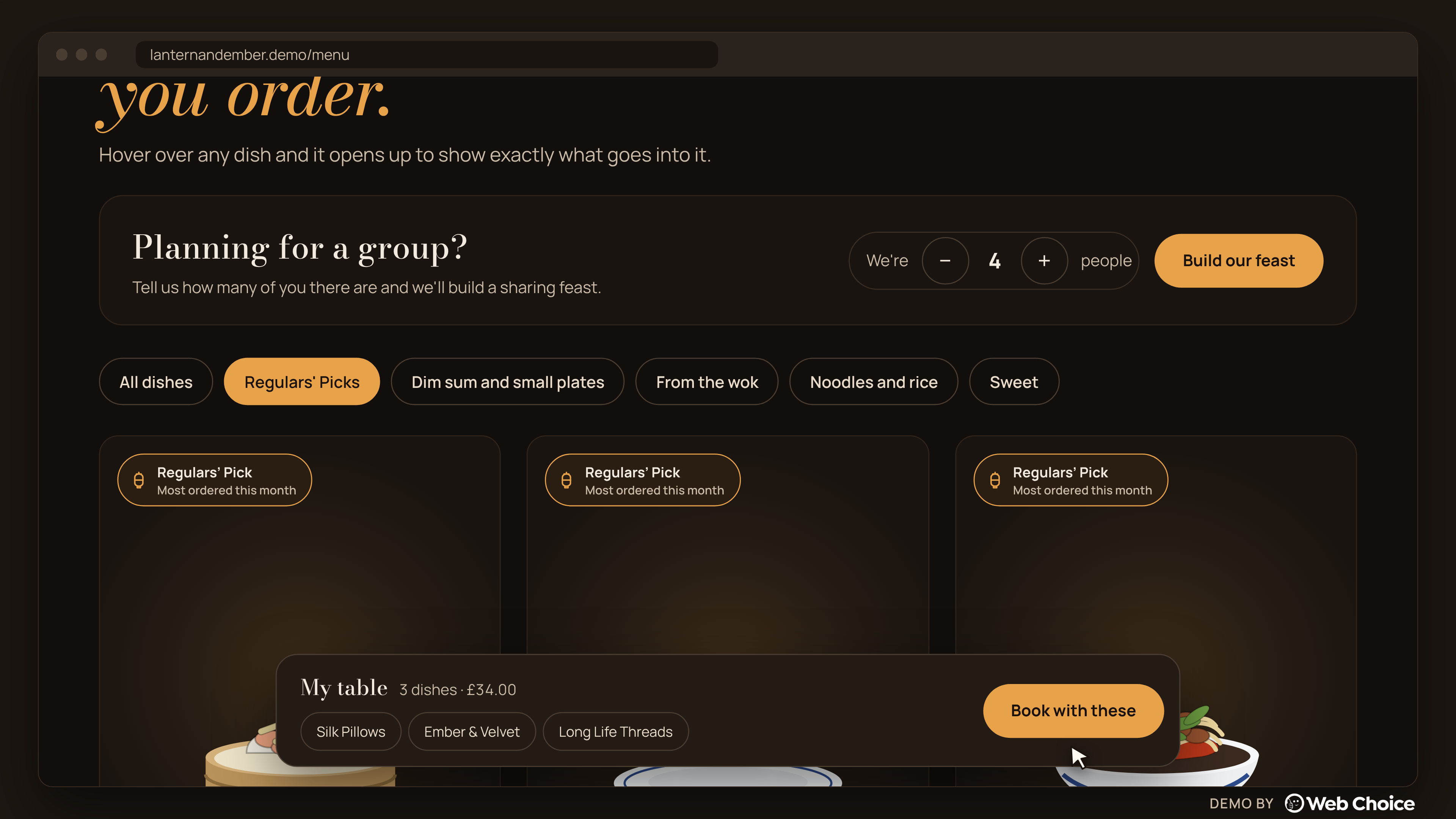
A 'Regulars' Picks' filter gives first-time visitors a short, trusted place to start.
All nine dishes are still one tap away. A nervous first-timer gets a short list they can trust, and a regular can ignore it. For this to stay honest on a live site, the badge has to come from real order data, not from whatever the kitchen wants to push.
2. Let people narrow down using what they already know
Visitors usually know something, even if it's not the dish name. They know they want noodles, or something small to share, or something sweet. Filters built around those plain categories ("Dim sum and small plates", "From the wok", "Noodles and rice", "Sweet") let them cut nine options to two or three without reading every card. Filters are still often missing or weak. Baymard Institute's product list research, last updated in September 2025, found 51% of ecommerce sites don't offer all five essential filter types, and in testing, people who couldn't find the filter they needed sometimes left to look elsewhere.
The test for a good filter is whether a customer would use those words. "Mains" and "Sides" are kitchen words. "Something to share" is a customer's.
3. Show the detail when it's asked for, not before
Designers call this progressive disclosure: show the essentials first and keep the detail behind a tap, a hover or an expandable section. It also works as a signal. Whatever appears first is what people assume matters most, so the first screen needs choosing with care.
On the Lantern & Ember menu, each card shows the name, price, rating and a one-line description. Hover over it (or tap on a phone) and the dish lifts apart into its labelled ingredients: prawn, bamboo shoot and crystal wrapper for the dumplings; chicken, dried chillies and Sichuan peppercorns for the Kung Pao.
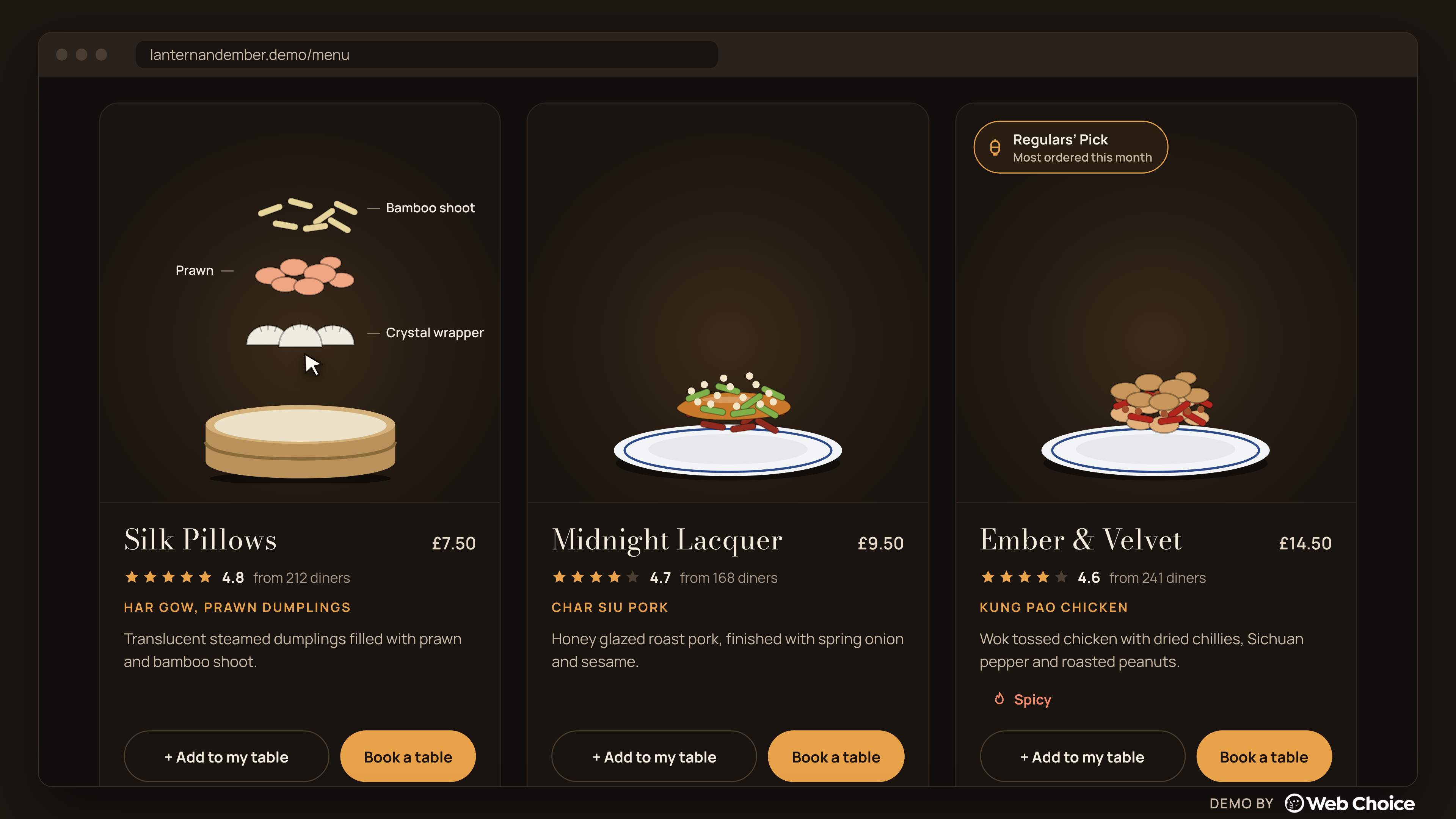
Hover or tap and each dish opens into its ingredients, so detail appears only when someone asks for it.
That answers the question "what actually is this?" in a second, without loading every card with a paragraph of description. It also takes care of the effort problem. People who already know the dish never have to open it.
4. Do the hard part for groups
Ordering for six people is a different task from ordering for one. You're juggling dietary needs, budget and how much food is enough. This is the "decision difficulty" factor from the research, and a standard menu leaves people to work it out alone.
The feast planner asks one question, how many of you are there, and builds a balanced sharing menu with a total and a price per head. For six people it suggests eleven plates across all nine dishes, £109.50 for the table, or about £18.25 each. People can change it, but they no longer start from a blank page.
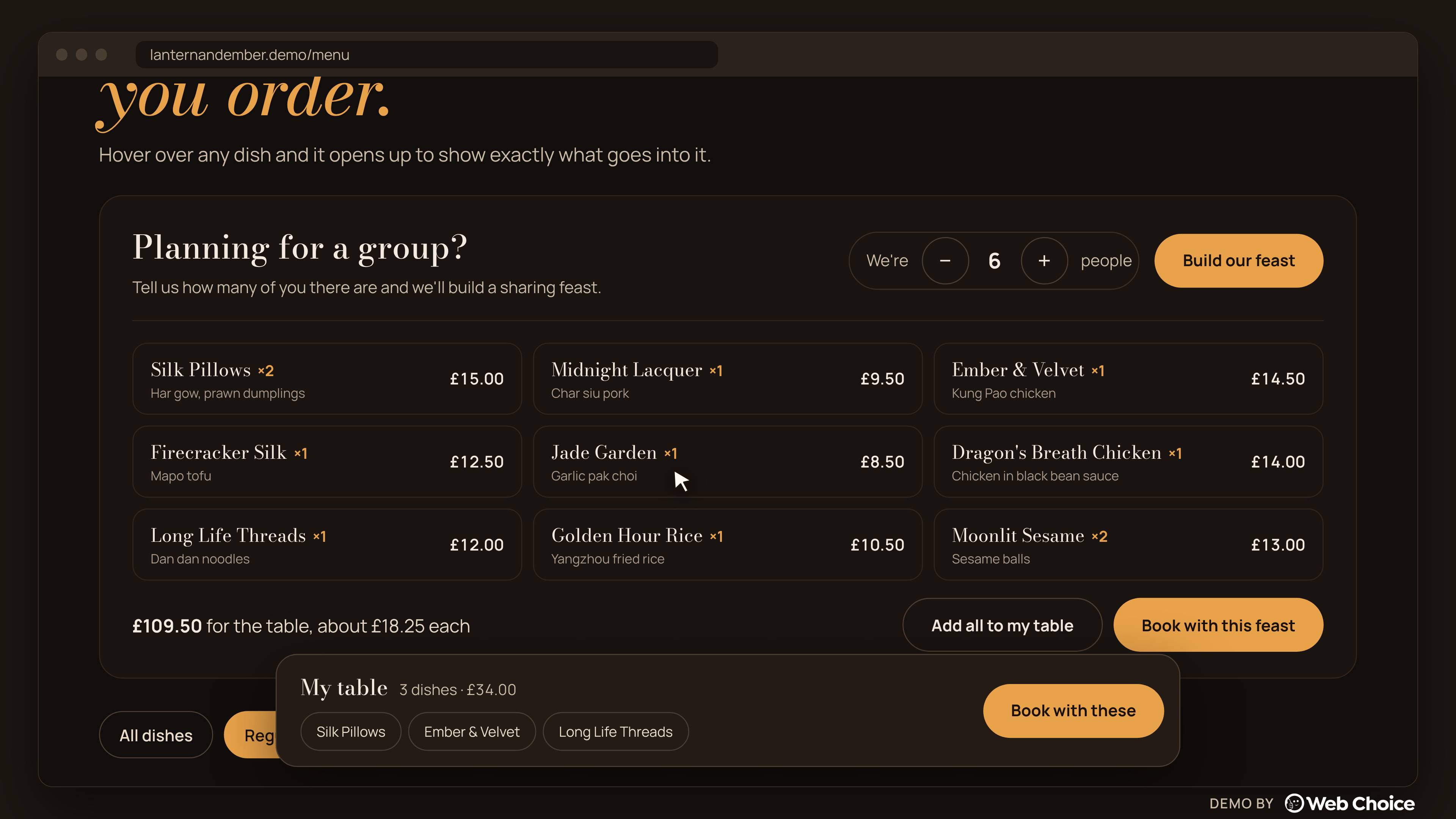
One question, how many of you, and the planner suggests a balanced menu with a price per head.
A sensible default turns "choose eleven things" into "check this looks right", which is a much easier job.
5. Keep choices visible and carry them forward
People lose track of what they've picked, especially on a phone. A small "My table" tray sits at the bottom of the screen with the dishes chosen so far and a running total. When the visitor books, the booking sheet already knows how many dishes they've picked and offers to have them ready when they sit down.
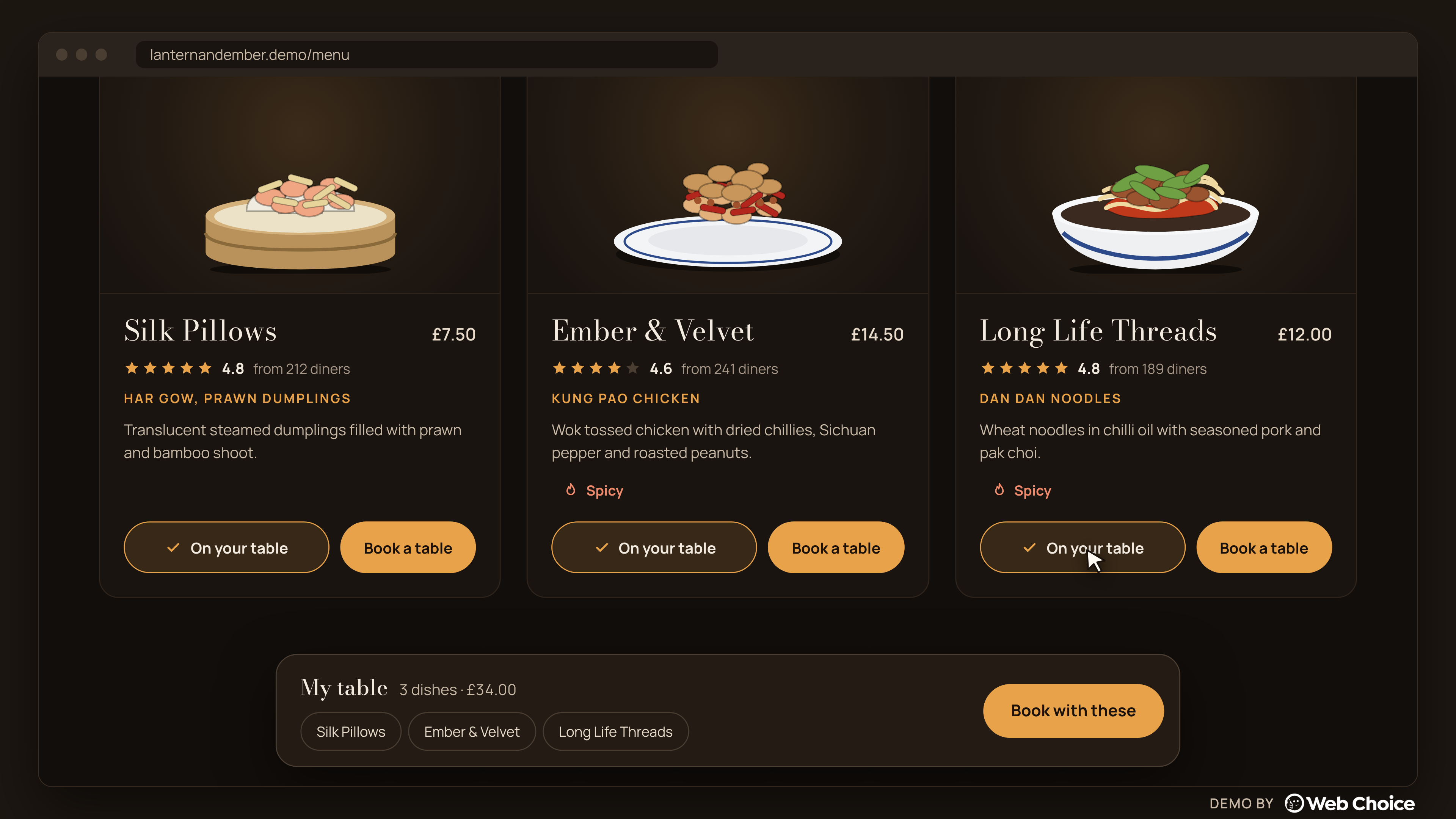
The My table tray keeps every choice and the running total in view.
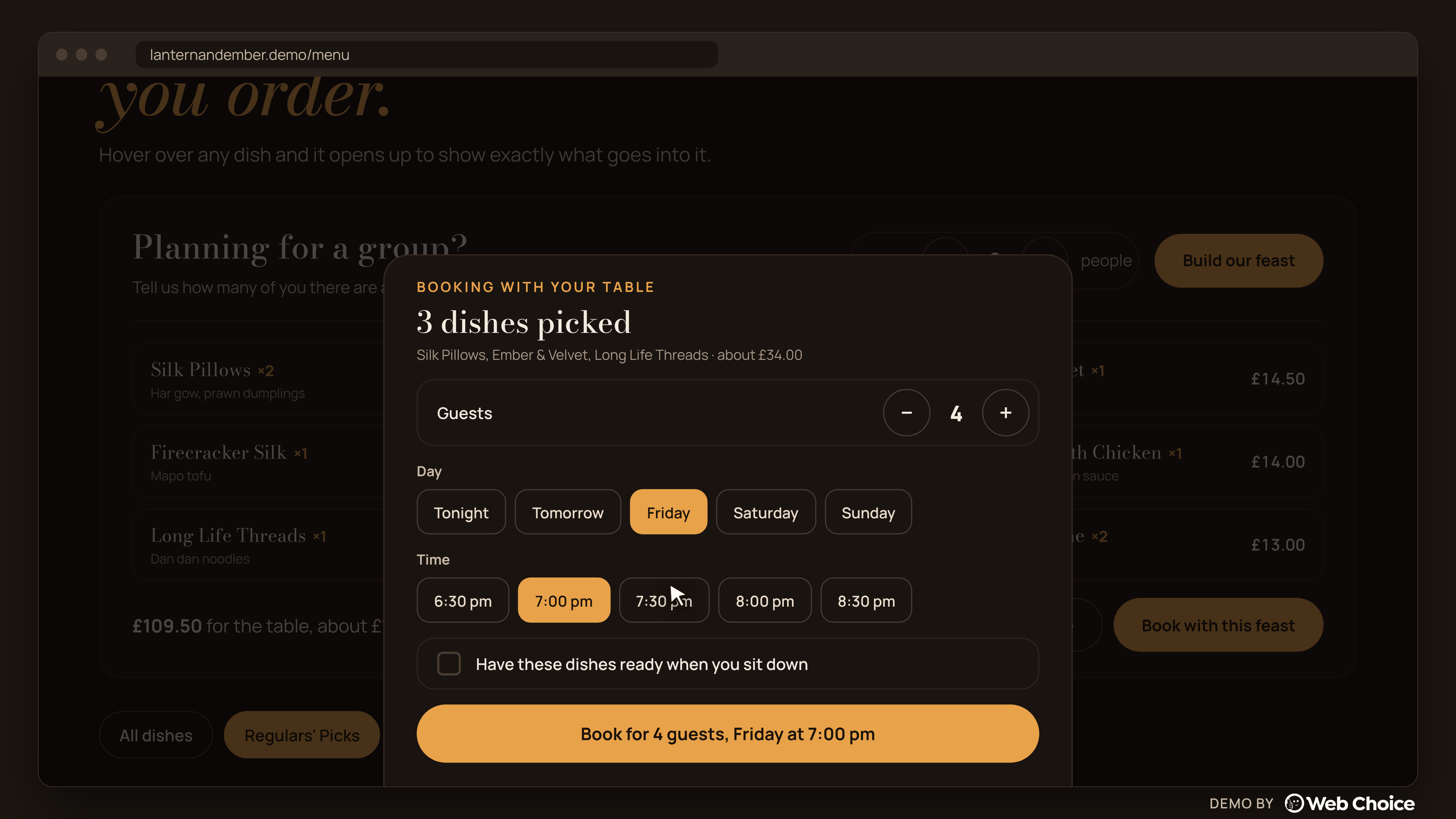
The booking sheet already knows what the visitor picked.
Nothing they chose is lost between the menu and the booking. Asking people to do the same work twice is an easy way to lose them.
See it in action
The walkthrough below shows each of these patterns working together, from the homepage to a held table.
Does this apply beyond restaurants?
Yes. Swap dishes for products, plans or services and the same four conditions apply. An online shop can use "most bought" labels and plain filters. A software company can open a pricing table on the plan most customers pick and keep the full feature comparison one click away. A trades business can let people answer two questions and see the service that usually fits. In each case the full range stays available. The website just stops asking people to compare everything at once.
A quick checklist for your own site
- Is there a clear starting point for people who don't know what they want, based on real data?
- Do your filters use the words your customers use?
- Can people get more detail on one option without opening a new page or a PDF?
- If people often buy for a group or a household, does the site help with the maths?
- Can people see what they've picked so far, and does it carry through to checkout or booking?
- Is the menu, catalogue or price list readable on a phone without downloading anything?
Frequently asked questions
Is choice overload real?
Yes, but it depends on the situation. A 2015 meta-analysis found it appears when options are complex, the decision is hard, people are unsure what they want, and they want to decide with minimal effort. A 2025 study using more sensitive tests found it with as few as three options that were hard to compare.
Should I reduce the number of products or menu items on my website?
Not necessarily. Cutting options can lose you customers who wanted the ones you removed. It's usually better to keep the range and make it easier to choose, with a clear starting point, plain filters and detail on demand.
What is progressive disclosure in UX?
It means showing the most important information or options first and keeping secondary detail behind a control the user can open, such as a tap, a hover or an expandable section. It keeps screens simple without hiding anything.
How should a restaurant show its menu online?
As a web page, not a PDF. Show prices, use plain categories, mark dietary information clearly, and make it easy to go from choosing to booking. In a 2021 YouGov poll for Wix, 17% of UK adults said a hard-to-access menu, such as a downloadable PDF, was their biggest complaint with restaurant websites.
Do "most popular" labels actually help?
They help people who don't know what to choose by giving them a starting point. They only work if they're true, so they should come from real sales or order data.
Lantern & Ember is a concept we built at Web Choice to work through these ideas; the dishes, prices and ratings are samples. If your site has more options than visitors seem to get through, we'd be glad to take a look at it with you.
Author: Tom Maynard | Company Owner of Web Choice UK
Tom Maynard is the Owner of Web Choice UK, leading a skilled team specialising in Web Design, Web Development, SEO, PPC, and Software Development. With over 20 years of industry experience, his focus is on delivering data-driven, high-performance digital solutions that help businesses scale and succeed online. Under his leadership, Web Choice UK builds websites and applications that are fast, secure, and optimised for search. Their strategies are designed to maximise visibility, drive qualified traffic, and generate measurable ROI.
Follow the Expert:


